Showing posts with label programming. Show all posts

Saturday, October 3, 2026

GRASP (software pattern)

GRASP (General Responsibility Assignment Software Patterns)

A set of very practical guidelines that help answer one of the most common object-oriented design questions: "Which class should be responsible for this responsibility?"

Here are the 9 original GRASP patterns (most people actively use 5–7 of them):

1 Information Expert

Assign responsibility to the class that has the necessary information

"That class already knows that information — let it do it"

Opposite: Anemic Domain Model + Service classes doing everything

2 Creator 

Who should create instances of Class A?

Class B should create A if B contains, aggregates, records, closely uses, or has the initializing data for A

Opposite: God factories everywhere, everything created in services

3 Controller 

Who should handle a system event / use case?

First object beyond UI that takes responsibility for the operation (usually façade-like object)

Opposite: Fat UI controllers, everything in God Service class

4 Low Coupling 

Assign responsibilities so classes depend on as few other classes as possible

"Keep dependencies minimal and stable"

Opposite: Classes knowing about 10+ other concrete classes

5 High Cohesion 

Keep related responsibilities together in one class

"Stuff that changes together, belongs together"

Opposite: Classes with 2–3 completely unrelated methods

6 Polymorphism 

When behavior varies by type— use polymorphism instead of conditionals

"Let the subclass decide how to behave"

Opposite: Big switch/if-else on type checking

7 Protected Variations (PV)

Identify points of predicted variation and protect them

"Encapsulate what varies" — very close to OCP

Opposite: Code full of if (type == "X") then…

8 Indirection 

Assign responsibility to an intermediate object to avoid direct coupling

"Don't talk to strangers" → introduce a middleman

Opposite: Direct dependency between two parts that change often

9 Pure Fabrication

Create artificial classes that aren't in the domain model when needed.

"It's okay to invent classes that don't represent real-world concepts"

Opposite: Forcing domain objects to do technical infrastructure

Larman, C. (2005). Applying UML and patterns: An introduction to object-oriented analysis and design and iterative development. Prentice Hall PTR.

source: Graph Design Pattern (PDF)

Saturday, August 8, 2026

footgun (slang)

A footgun is a slang term for a design feature, tool, or piece of code that allows or encourages users to accidentally cause self-harm or make severe mistakes. It is a metaphor for a gun designed in such a way that you easily shoot yourself in the foot.

Key Characteristics

Not a bug: The system works exactly as intended and written, but the design is dangerous or counter-intuitive.

Blames design, not user: It highlights a flaw in how a tool is structured rather than calling the user foolish.

Common in programming: Frequently used to describe confusing APIs, overly permissive settings, or dangerous syntax.


source: AI overview

Similar: pitfall, pothole, landmine, boobytrap (though not normally intentional or malicious)

Tuesday, March 24, 2026

vibe coding

Reportedly, the first occurrence of the term "vibe coding" is attributed to Andrej Karpathy, one of the founders of OpenAI, on X in early 2025.

Andrej Karpathy @karpathy Feb 2, 2025

There's a new kind of coding I call "vibe coding", where you fully give in to the vibes, embrace exponentials, and forget that the code even exists. ... I ask for the dumbest things like "decrease the padding on the sidebar by half" because I'm too lazy to find it. I "Accept All" always, I don't read the diffs anymore. When I get error messages I just copy paste them in with no comment, usually that fixes it. The code grows beyond my usual comprehension, I'd have to really read through it for a while. Sometimes the LLMs can't fix a bug so I just work around it or ask for random changes until it goes away. It's not too bad for throwaway weekend projects, but still quite amusing. I'm building a project or webapp, but it's not really coding - I just see stuff, say stuff, run stuff, and copy paste stuff, and it mostly works.

source: https://x.com/karpathy/status/1886192184808149383

I don't know Karpathy, but I do know people who use the approach "can't fix a bug so I just work around it until it goes away". I also know people who stop after "it mostly works". Now for "throwaway weekend projects", that's fine--as long as it's thrown away. I do take offense that "webapp" is not really coding. If anything is not real coding, it's "vibe coding".

But I've been thinking about what we do with the code generated by AI and comparing it to older methods of improving programming. Programming languages have been described using generations. The following definitions are adapted from Wikipedia. In early 2026, the generative-AI LLMs write 3GL languages. The 3GL code becomes the persisted, maintained content. Whereas the 3GL language compiles down to a 2GL and ultimately a 1GL language. The 2GL and 1GL content (e.g., exe, lib, obj) is not maintained. It is always regenerated from the higher-level language. At some point, I expect AI prompts and skills to become a 6GL written in natural language (like COBOL hoped to be).

First generation (1GL)

A first-generation programming language (1GL) is a machine-level programming language. The instructions in 1GL are expressed in binary, represented as 1s and 0s. 

Second generation (2GL)

Second-generation programming language (2GL) is a generational way to categorize assembly languages.

Third generation (3GL)

Examples: C, C++, Java, Python, PHP, Perl, C#, BASIC, Fortran, COBOL

3GLs are much more machine-independent (portable) and more programmer-friendly. 3GLs are more abstract than previous generations of languages, and thus can be considered higher-level languages than their first- and second-generation counterparts. Most 3GLs support structured programming. Many support object-oriented programming. Traits like these are more often used to describe a language rather than just being a 3GL.

Fourth generation (4GL)

Examples: Unix shell, SQL, Oracle Reports, R

Fourth-generation languages tend to be specialized toward very specific programming domains. 4GLs may include support for database management, report generation, mathematical optimization, GUI development, or web development.

Fifth generation (5GL)

Examples: Prolog, OPS5, Mercury, ICAD, Geometry Expert, LISP

A fifth-generation programming language (5GL) is any programming language based on problem-solving using constraints given to the program, rather than using an algorithm written by a programmer. They may use artificial intelligence techniques to solve problems in this way. Most constraint-based and logic programming languages and some other declarative languages are fifth-generation languages. Fifth-generation languages are used mainly in artificial intelligence or AI research. 

Saturday, March 7, 2026

Semantic Versioning (SemVer)

Semantic versioning (also known as SemVer) is a universal way of versioning the software development projects to track what is going on with the software as versions are being built almost every day. In brief, it's a way for numbering the software releases.

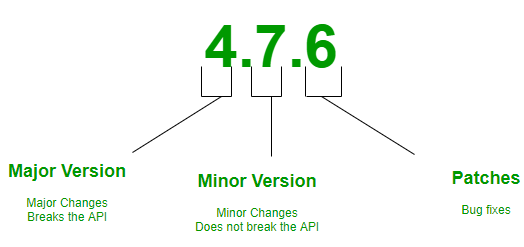
So, SemVer is in the form of Major.Minor.Patch. 

Semantic Versioning is a 3-component number in the format of X.Y.Z, where :  

  • X stands for a major version. The leftmost number denotes a major version. When you increase the major version number, you increase it by one but you reset both patch version and minor versions to zero. If the current version is 2.6.9 then the next upgrade for a major version will be 3.0.0. Increase the value of X when breaking the existing API.
  • Y stands for a minor version. It is used for the release of new functionality in the system. When you increase the minor version, you increase it by one but you must reset the patch version to zero. If the current version is 2.6.9 then the next upgrade for a minor version will be 2.7.0. Increase the value of Y when implementing new features in a backward-compatible way.
  • Z stands for a Patch Versions: Versions for patches are used for bug fixes. There are no functionality changes in the patch version upgrades. If the current version is 2.6.9 then the next version for a patch upgrade will be 2.6.10. There is no limit to these numbers. Increase the value of Z when fixing bugs

Points to keep in mind : 

  • The first version starts at 0.1.0 and not at 0.0.1, as no bug fixes have taken place, rather we start with a set of features as the first draft of the project.
  • Before 1.0.0 is only the Development Phase, where you focus on getting stuff done. This stage is for developers in which the system is being developed.
  • SemVer does not cover libraries tagged 0.*.*. The first stable version is 1.0.0.

source: https://www.geeksforgeeks.org/software-engineering/introduction-semantic-versioning/

Given a version number MAJOR.MINOR.PATCH, increment the:

  1. MAJOR version when you make incompatible API changes
  2. MINOR version when you add functionality in a backward compatible manner
  3. PATCH version when you make backward compatible bug fixes

Additional labels for pre-release and build metadata are available as extensions to the MAJOR.MINOR.PATCH format.

source: https://semver.org/

Saturday, July 19, 2025

SIFERS (front-end unit testing technique)

Simple Injectable Functions Explicitly Returning State (SIFERS) are a way to capture what the tests should do when setting up the testing environment as well as returning a mutable clean state. A SIFERS is just a function that accepts some overridable/injectable parameters and returns some form of state. 

source: https://medium.com/@kolodny/testing-with-sifers-c9d6bb5b362

AI Overview

Core Idea

Explicit State Management

SIFERS moves away from implicit state management (e.g., using beforeEach hooks) and instead uses a single function that explicitly defines and returns the necessary state for each test. 

Function as a Service

This setup function, often called setup(), acts as a service that provides the necessary mocks, dependencies, and initial state for the unit tests. 

No State Leakage

By returning new object references for each test, SIFERS prevents any unintended side effects or state leakage from one test to another. 

How it Works

1. Define a setup() function:

This function will be responsible for creating and returning the necessary state for your tests. It can accept parameters to customize the setup based on the specific test case.

2. Return state:

The setup()function returns an object containing all the necessary dependencies, mocks, and initial state for the test.

3. Use the returned state:

In each test case, you can access the state returned by the setup()function and use it to interact with the system under test. 

Saturday, July 5, 2025

Canonicalization, Normalization

In computer science, canonicalization (sometimes standardization or normalization) is a process for converting data that has more than one possible representation into a "standard", "normal", or canonical form. 

This can be done to compare different representations for equivalence.

URL

A canonical URL is a URL for defining the single source of truth for duplicate content.

XML

XML canonical form, briefly defined, removes whitespace within tags, uses particular character encodings, sorts namespace references and eliminates redundant ones, removes XML and DOCTYPE declarations, and transforms relative URIs into absolute URIs.

source: https://en.wikipedia.org/wiki/Canonicalization

Phone Number

A canonical phone address is a text string with the following structure:

+ CountryCode Space [(AreaCode) Space] SubscriberNumber

For example, +1 (425) 882-8080

source: https://tapiex.com/TPNet_Help/Canonical%20Addresses.htm

Unicode Normalization Forms

Canonical and Compatibility Equivalence

Canonical equivalence is a fundamental equivalency between characters or sequences of characters which represent the same abstract character, and which when correctly displayed should always have the same visual appearance and behavior.

Normalization Forms

The Unicode Normalization Algorithm puts all combining marks in a specified order, and uses rules for decomposition and composition to transform each string into one of the Unicode Normalization Forms.

The four Unicode Normalization Forms are: 

  • Normalization Form D (NFD) = Canonical Decomposition
  • Normalization Form C (NFC) = Canonical Decomposition, followed by Canonical Composition
  • Normalization Form KD (NFKD) = Compatibility Decomposition
  • Normalization Form KC (NFKC) = Compatibility Decomposition, followed by Canonical Composition

source: https://unicode.org/reports/tr15/

See also data normalization (TWOTW)

Saturday, May 10, 2025

POUR - WCAG

The Web Content Accessibility Guidelines (WCAG), developed by the World Wide Web Consortium, are technical standards that help make the digital world accessible to people with disabilities. WCAG standards are rooted in four main principles: perceivable, operable, understandable, and robust, often called POUR.

Perceivable

Information must be perceivable to people using only one of their senses, so they understand all related content.

My thots: Check the contrast outside under bright lighting conditions. Ensure the audio understandable in a noisy room. Both light and dark backgrounds are common, ensure text color adjusts. There are various forms of color-blindness, check using a color-blind simulator and/or in grayscale to ensure no meaningful information is lost--that is, a red circle and a green circle are the same when the color is muted. Wear hearing protection to ensure alternatives to increasing the volume are available when possible. Blur your vision (or remove your glasses) to ensure the text and image size can be increased to improve readability. Ensure temporary notifications display sufficiently long to be recognized when distracted. Display on a large projected image (where color and contrast may vary).

Operable

End users must be able to interact with all webpage elements. For instance, your website should be easily navigable with just a keyboard or voice controls for non-mouse users.

My thots: Wear gloves, thus causing a loss of precise touch. Use just a keyboard--don't rely on a mouse cursor. Use just a touch-screen--don't rely on hover-text. Use a small screen (e.g., mobile phone). Use a connected display some distance away with just a mouse, for example, use a wide-screen TV and a mouse on an uneven surface or a TV remote.

Understandable

The principle is just what it seems—end users must be able to understand web page content and functionality information.

My thots: this principle should be true for all means of communication, but it is very difficult especially given the diversity of the audience. Those who don't know English are left with machine translation. As a person with an analytical, engineering mind, I find that most web sites do a very poor job with understandability for me because their audience is primarily non-technical, emotionally driven, neurotypical people. If I don't already know what a company does, visiting their website seldom gives me more than just a clue about what they do. For example, take this headline, "Essential Software - For the People Who Change the World." OK, at least I know it's a software company, but what kind and is it cloud-based, mobile, desktop, a framework to be integrated, self-service or requires technical professional consultants to configure? The next subheading helps: "Software built for fundraising, nonprofit accounting, education, CSR and more." Now, I know what markets this software is design to meet. There's a financial component and an educational component and CSR, whatever that is--though if I don't know what CSR means, this software is probably not what I need. But then the subheading continues with "Fueling bigger, bolder impact — everywhere." What does that mean? 

Robust

Your website must effectively communicate information to all users, including users of assistive technologies, and remain compatible with evolving technologies and user needs.

My thots: let's face, this is a goal seldom reached because of expense and lack of knowledge of capabilities. Also, not everything needs to be accessible, at least not on a practical level. For example, a website to sell a product that requires sight to use has little need for a website compatible with those who can't see. Technology has advanced making some best practices no longer important. For example, using relative styles (i.e., not "pt") for font size is not nearly as important now that browsers allow the magnification of the entire screen to scale. 

My biggest fight has been with web page designers who want to control the appearance of the page and not allow the viewer to decide how they want to interact with the content.

source: https://www.wcag.com/resource/what-is-wcag/

Saturday, May 3, 2025

Speed controls

Debounce

Debouncing means to discard operations that occur too close together during a specific interval, and consolidate them into a single invocation.

Debouncing is very similar to throttling. The key difference is that throttling enforces limits on continuous operations, while debouncing waits for invocations to stop for a specific time to consolidate many noisy invocations into one single invocation.

Rate limit

Rate limiting means controlling how many operations can be performed in a given amount of time, usually to avoid overloading the system and causing performance degradation. For example, a server might limit the number of requests it will accept from a single client in a given time period, which not only optimizes the server's overall performance but also mitigates attacks like DoS (denial-of-service).

Rate limiting is typically synonymous with throttling, although debouncing is another viable strategy which provides better semantics and user experience in certain cases.

Throttle

Throttling refers to slowing down a process such that an operation can only be performed at a certain rate.

Throttling is very similar to debouncing. The key difference is that when invocations happen continuously, throttling ensures that the operation is still performed at a certain maximum rate, while debouncing waits indefinitely until the invocations stop for a certain amount of time.

Choke 

Network Choke Point

A point in a computer network through which all or most of the traffic in the network flows. Such points are vulnerable to both crackers and hardware failure. One of the main strategies of network designers is to minimize or eliminate the number of choke points.

Carburetor Choke Value

Choke valves supply a richer fuel mixture when starting the engine by restricting air flow.
source: https://en.wikipedia.org/wiki/Choke_valve

Industrial Fluid Choke Value

In the extraction of petroleum, a choke valve (or "choke") is an adjustable flow limiter that is designed to operate at a large pressure drop, at a large flow rate, for a long time.
source: https://en.wikipedia.org/wiki/Choke_valve

Electronics (Inductor)

In electronics, a choke is an inductor used to block higher-frequency alternating currents (AC) while passing direct current (DC) and lower-frequency ACs in a circuit. The name comes from blocking—"choking"—high frequencies while passing low frequencies.
source: https://en.wikipedia.org/wiki/Choke_(electronics)

Governor

A governor is a mechanical device that automatically maintains the rotary speed of an engine within reasonably close limits regardless of the load. A typical governor regulates an engine’s speed by varying the rate at which fuel is furnished to it.


souce:https://www.britannica.com/technology/governor-machine-component

Exponential Backoff / Retry

The idea behind exponential backoff is to use progressively longer waits between retries for consecutive error responses. Exponential backoff can lead to very long backoff times, because exponential functions grow quickly. You should implement a maximum delay interval and a maximum number of retries. The maximum delay interval and maximum number of retries are not necessarily fixed values. They should be set based on the operation being performed and other local factors, including network latency.

Jitter

Retries can be ineffective if all clients retry at the same time. To avoid this problem, a random amount of time before making or retrying a request is added to help prevent large bursts by spreading out the arrival rate. Most exponential backoff algorithms use jitter to prevent successive collisions. 

source: https://aws.amazon.com/blogs/mt/managing-monitoring-api-throttling-in-workloads/

Circuit breaker

The Circuit Breaker design pattern is commonly used in software development to improve system resilience and fault tolerance. Circuit breaker pattern can prevent cascading failures particularly in distributed systems. The circuit breaker pattern can be used in conjunction with other patterns, such as retry, fallback, and timeout, to enhance fault tolerance in systems.

  • Closed - normal operation
  • Open - returns an error immediately
  • Half-open - a limited number of requests are allowed to pass and the state may change to Closed or Open depending on whether the request succeeds or fails.

source: https://en.wikipedia.org/wiki/Circuit_breaker_design_pattern

See also

Bulkhead isolation

Limits the resources consumable by the governed actions, such that a fault 'storm' cannot cause a cascading failure also bringing down other operations.

A bulkhead is a wall within a ship which separates one compartment from another, such that damage to one compartment does not cause the whole ship to sink. Premise: One fault shouldn't bring down the whole ship!

When a process begins to fault, it can build up a large number of requests, all potentially failing slowly in parallel. If unconstrained, these can chew up ever greater resource (CPU, threads, memory, etc.) in the host, degrading capability or eventually causing outright failure.

In a variant, a faulted downstream system can lead to a 'backing up' of large numbers of requests in its consumers. If ungoverned, these 'backed-up' calls can in turn consume all resources in the consumer, leading to a cascading upstream failure.

source: https://github.com/App-vNext/Polly/wiki/Bulkhead


Saturday, March 8, 2025

Semantic Type

A semantic type applies a human-centric meaning to a primitive data type in the domain of the application. For example, defining an EmailAddress type instead of using the more loosely typed String helps guard against bug and provides validation ensuring the value of the semantic type is always valid.

Most of semantic data types detection engines are rule based with regular expressions or data dictionaries inside. Most rules are quite simple.

Most common usage are:

  •     to find the data that should be secured (personal identifiable information)
  •     to implement quality control metrics and ensure data integrity
  •     to integrate data automatically by type

So keywords here are observability, security and integration.

source: Semantic data types

See Semantic data types registry

See also Opaque Identifier Validation (twotw)

Saturday, February 1, 2025

Feature Gate

A feature gate is a mechanism to configure which features are visible to users without changing application code. You might also hear them called feature flags or feature toggles.

When to use feature gates

Feature gates are commonly used as on/off switches to turn a certain system behavior on or off in production. They may be used:

  • to enable certain features for a percentage of the total user base, for example, A/B testing
  • to gradually ramp up a software release across the user base to limit the impact of any unanticipated system behavior
  • to limit a new feature to specific users before the feature is ready for general availability in production
  • to quickly turn off a particular feature for all users
  • to target a specific set of users thereby implementing whitelisting
Statsig uses the term feature gates, as they act as a "gatekeeper" to new features.

Other Uses

In Kubernetes, feature gates are a set of key=value pairs that describe Kubernetes features. You can turn these features on or off using the --feature-gates command line flag on each Kubernetes component.

Microsoft Azure .NET provides the FeatureGate attribute that can be placed on MVC controllers, controller actions, or Razor pages to require all or any of a set of feature flags to be enabled.

Saturday, September 14, 2024

UPPERCASE is better than lowercase when comparing text

If locale-based string comparison is not available, converting to UPPERCASE is better than lowercase. For example,

uppercase("Straße") == uppercase("Strasse") == "STRASSE"

lowercase("Straße") != lowercase("Strasse"), because "straße" != "strasse"

For more on the ß character, see Eszett (ß = German sharp S).

UPDATE: According to Wikipedia, "Traditionally, ⟨ß⟩ did not have a capital form, although some type designers introduced de facto capitalized variants. In 2017, the Council for German Orthography officially adopted a capital, ⟨ẞ⟩, as an acceptable variant in German orthography, ending a long orthographic debate. Since 2024 the capital ⟨ẞ⟩ (ligature) has been preferred over ⟨SS⟩ (two letters)."

If you are making a decision based on the result of a string comparison or a case change, be sure to avoid the invariant culture. See Invariant Culture.

Saturday, July 20, 2024

Coding Priorities

Coding Priorities

If you were to ask three different friends to drop by the supermarket to pick up some asparagus, green beans, and corn, would it surprise you to find that one friend bought canned vegetables because were the cheapest, another bought frozen vegetables because they were easiest to cook, and the third bought fresh vegetables because they were organically grown and tasted the best? Can you at least imagine such a thing happening?

The three friends buy different types of vegetables for the same reason one programmer will emphasis speed in his code, another will emphasize small size in hers, and a third will emphasize simplicity--their choices differ because their priorities are different. (p. 17)

From book: Debugging the Development Process

I frequently refer to the section titled "Know Your Coding Priorities" (p. 18).

  • Size: memory, storage, or bandwidth
  • Speed: execution time to complete a task
  • Robustness: resilience to bad input, i.e., hard to "crash"
  • Testability: effort needed to verify expected behavior
  • Maintainability: effort for someone else to fix a bug or add a feature
  • Simplicity: experience another developer needs to read and understand the code,  dependencies, and interactions
  • Reusability: you or other teams use the code in other use cases
  • Portability: effort required to migrate to another platform (e.g., database, browser, mobile OS, cloud provider, etc)
  • Readability: time another developer needs to correctly understand the intent by looking at a section of code
 

Friday, August 11, 2023

Marker Interface

The marker interface pattern is a design pattern in computer science, used with languages that provide run-time type information about objects. To use this pattern, a class implements a marker interface (also called tagging interface) which is an empty interface, and methods that interact with instances of that class test for the existence of the interface. Whereas a typical interface specifies functionality (in the form of method declarations) that an implementing class must support, a marker interface need not do so. The mere presence of such an interface indicates specific behavior on the part of the implementing class. 

source: https://en.wikipedia.org/wiki/Marker_interface_pattern

See also: Marker Interface Isn’t a Pattern or a Good Idea by Erik Dietrich, NDepend


Friday, August 4, 2023

Code Smell

"A code smell is a surface indication that usually corresponds to a deeper problem in the system. The term was first coined by Kent Beck while helping me with my [Martin Fowler] Refactoring book.

The quick definition above contains a couple of subtle points. Firstly a smell is by definition something that's quick to spot - or sniffable as I've recently put it. A long method is a good example of this.

The second is that smells don't always indicate a problem. Some long methods are just fine. You have to look deeper to see if there is an underlying problem there - smells aren't inherently bad on their own - they are often an indicator of a problem rather than the problem themselves." ~ Martin Fowler

source: https://martinfowler.com/bliki/CodeSmell.html

During code reviews, when you sniff a smell, link to the 'Smells and Heuristics' chapter from Bob Martin's excellent book: Clean Code. 

Clean Code: Smells and Heuristics

Suggested:


Saturday, April 15, 2023

monotonic sequence

A monotonic sequence is always increasing or always decreasing. Monotonicity does not imply uniform increasing (or decreasing) values. That is, the values may not be strictly sequential. While 1, 2, 3, 4 is a monotonic sequence, so is 4, 125, 291, 1424. 

Example usage: ServiceBusReceivedMessage.SequenceNumber Property

The sequence number is a unique 64-bit integer assigned to a message as it is accepted and stored by the broker and functions as its true identifier. For partitioned entities, the topmost 16 bits reflect the partition identifier. Sequence numbers monotonically increase. They roll over to 0 when the 48-64 bit range is exhausted.

That it can roll over means it's not strictly monotonic.

Monotonicity in election methods

Monotonicity is an election method criterion that requires the following:

Ranking or rating a candidate higher should never cause that candidate to lose, nor should ranking or rating a candidate lower ever cause that candidate to win, assuming all other candidates remain rated or ranked the same.

In other words, an election method is non-monotonic if either of the following is possible:

  • A winner can be changed to a loser by experiencing an increase in support, OR
  • A loser can be changed to a winner by experiencing a decrease in support.

One noteworthy non-monotonic election method is instant runoff voting (IRV).

source: https://electionscience.org/library/monotonicity/


Saturday, April 23, 2022

Destructuring assignment

ECMAScript, TypeScript, JavaScript

The destructuring assignment syntax is a JavaScript expression that makes it possible to unpack values from arrays, or properties from objects, into distinct variables.

let a, b, rest;
[a, b] = [10, 20];

console.log(a);
// expected output: 10

console.log(b);
// expected output: 20

[a, b, ...rest] = [10, 20, 30, 40, 50];

console.log(rest);
// expected output: Array [30,40,50]

C#

C# features built-in support for deconstructing tuples, which lets you unpackage all the items in a tuple in a single operation. The general syntax for deconstructing a tuple is similar to the syntax for defining one: you enclose the variables to which each element is to be assigned in parentheses in the left side of an assignment statement. For example, the following statement assigns the elements of a four-tuple to four separate variables:

var (name, address, city, zip) = contact.GetAddressInfo();

C# 'params'

By using the params keyword, you can specify a method parameter that takes a variable number of arguments. The parameter type must be a single-dimensional array.

When you call a method with a params parameter, you can pass in:

    A comma-separated list of arguments of the type of the array elements.
    An array of arguments of the specified type.
    No arguments. If you send no arguments, the length of the params list is zero.

The following example demonstrates various ways in which arguments can be sent to a params parameter.

public static void UseParams(params int[] list)...


static void Main(){
    // You can send a comma-separated list of arguments of the
    // specified type.
    UseParams(1, 2, 3, 4);

    // An array argument can be passed, as long as the array
    // type matches the parameter type of the method being called.
    int[] myIntArray = { 5, 6, 7, 8, 9 };
    UseParams(myIntArray);

source: https://developer.mozilla.org/en-US/docs/Web/JavaScript/Reference/Operators/Destructuring_assignment

source: https://docs.microsoft.com/en-us/dotnet/csharp/fundamentals/functional/deconstruct?wt.mc_id=academic-0000-chnoring

source: https://docs.microsoft.com/en-us/dotnet/csharp/language-reference/keywords/params


Saturday, April 16, 2022

spread (...) operator

Spread operator, Spread syntax

ECMAScript, TypeScript, JavaScript

Spread syntax can be used when all elements from an object or array need to be included in a list of some kind. 

Syntax

For function calls:

myFunction(...iterableObj); // pass all elements of iterableObj as arguments to function myFunction

For array literals:

[...iterableObj, '4', 'five', 6]; // combine two arrays by inserting all elements from iterableObj

For object literals (new in ECMAScript 2018):

let objClone = { ...obj }; // pass all key:value pairs from an object

source: https://developer.mozilla.org/en-US/docs/Web/JavaScript/Reference/Operators/Spread_syntax

Friday, February 25, 2022

Exponential backoff and circuit breaker

The idea behind using exponential backoff with retry is that instead of retrying after waiting for a fixed amount of time, we increase the waiting time between reties after each retry failure. Incrementally increasing the wait time between the consecutive retry requests after each failure gives the service some breathing time so that if the fault is due to service overload, it could get resolved faster.

The intent of the Circuit Breaker pattern is to handle the long-lasting transient faults. If the number of retry failures reaches above a certain threshold value, further calls to the service will immediately return failure to the caller instead of executing our retry logic. If the service becomes available after some timeout, the callers will be able to call the service and the usual retry mechanism will come in play again.

source: https://dzone.com/articles/understanding-retry-pattern-with-exponential-back

Friday, January 21, 2022

Post/Redirect/Get (PRG)

Post/Redirect/Get (PRG) is a web development design pattern that lets the page shown after a form submission be reloaded without submitting the form another time. Some browsers mitigate this risk by warning the user that they are about to re-issue a POST request.

To avoid this problem, many web developers use the PRG pattern—instead of responding with content, the server responds to a POST request by redirecting the client to another location. The HTTP 303 See Other response code to cause the browser to REDIRECT and GET a new page.

The PRG pattern cannot address every scenario of duplicate form submission. For example, if a web user refreshes before the initial submission completes, possibly because of server lag, a duplicate POST occurs in certain user agents.

Source: http://en.wikipedia.org/wiki/Post/Redirect/Get 2022-01-18

Friday, March 26, 2021

Postel's Law or the Robustness Principle

In computing, the robustness principle is a design guideline for software:

Be conservative in what you do, be liberal in what you accept from others (often reworded as "Be conservative in what you send, be liberal in what you accept").

The principle is also known as Postel's law, after Jon Postel.

In other words, programs that send messages to other machines (or to other programs on the same machine) should conform completely to the specifications, but programs that receive messages should accept non-conformant input as long as the meaning is clear.

source: Robustness principle (wikipedia)

This simple statement captures a significant concept in the design of interoperable systems. Many consider the application of the robustness principle to be instrumental in the success of the Internet as well as the design of interoperable protocols in general.

Time and experience shows that negative consequences to interoperability accumulate over time if an implementations apply the robustness principle. This problem originates from an assumption implicit in the principle that it is not possible to affect change in a system the size of the Internet. That is, the idea that once a protocol specification is published, changes that might require existing implementations to change are not feasible.

Many problems that might lead to applications of the robustness principle are avoided for protocols under active maintenance. Active protocol maintenance is where a community of protocol designers, implementers, and deployers work together to continuously improve and evolve protocols. A community that takes an active role in the maintenance of protocols can greatly reduce and even eliminate opportunities to apply the robustness principle.

source: The Harmful Consequences of the Robustness Principle (IETF)

In my opinion, the critical factor of the criticism is "protocols under active maintenance" and the assumption that "it is not possible to affect change." Most developers are trying to implement just one side of an established protocol and the task is simply to get the program to work and reduce its fragility. For this scenario, robustness is of benefit. For those developing protocols and reference implementations, strictness has the benefit of early detection of defects and ambiguous requirements.